Intensity Corrections Definition
As discussed in the Intensity Time Trace Panel manual page, it
is sometimes useful to apply corrections to the measured intensity of a region
of interest, if known acquisition parameter modifications have been applied at
different time points. This is done by providing a correction file, which can
be created using a simple user interface accessed with the
Analysis:FLI Dataset Series:Define Intensity Corrections menu item. This
opens up the following window:
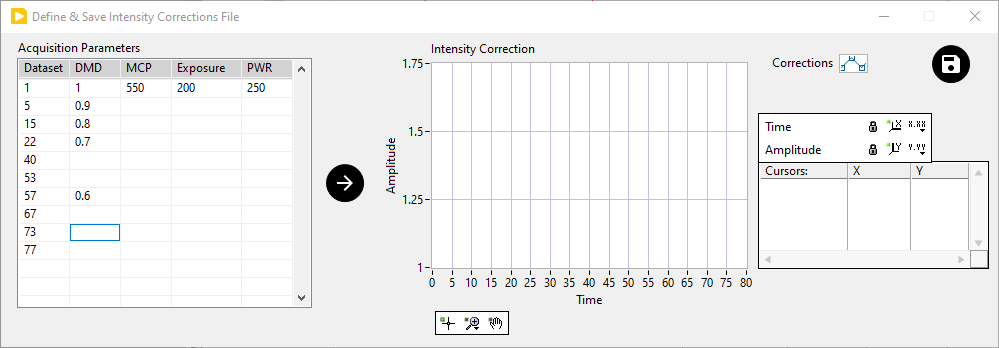
The window is comprised of:
a table of acquisition parameters (left-hand side)
a graph representing the resulting correction factors to apply to a given intensity time trace (right-hand side)
The parameters which can be provided for different time points at which some parameter modification occurs are:
Dataset: the dataset number at which the change happens
DMD: the attenuation factor applied to the incident illumination. In experiments using a digital mirror device (DMD), this can be the actual gray value sent to the DMD, or the fraction of the maximum value sent to the DMD.
MCP: the MCP voltage (in V). This value is used to apply an interpolated gain factor for a specific device and will probably result in erroneous corrections for other devices. Please post a feature request in the AlliGator Support Google Group if better control over this parameter would be useful for your application.
Exposure: the duration of exposure for each gate (arbitrary unit)
PWR: incident excitation power (arbitrary unit)
Only the first row needs to be filled completely (as shown above). The last row needs to contain at least the dataset number, and is used to specify the number of entries in the correction file.
If a single parameter is modified at a given time point (dataset), only that single parameter value needs to be entered. It is implicitly assumed that if the other parameters are not entered, this means that they have not been modified.
Once the different parameters have been entered, press the Arrow button in the middle to graphically check the resulting correction factor which will be applied to the intensity time trace in AlliGator.
When done, save the file using the Save button next to the Intensity Correction graph legend. The file is an ASCII file and can also be edited manually (be aware that some text editors add hidden characters and formatting information to files, rendering these illegible by software expecting an ASCII file - such as AlliGator).
In general, different correction files may be needed for different regions of interest in the image, if the illumination scheme is sophisticated enough (e.g. if a DMD has been used).