Plot Editor Window
The Plot Editor can be accessed by right-clicking on the name of a plot in most graph objects in AlliGator. It allows basic plot modifications, including style and data changes.
The picture below provides an overview of the editor:
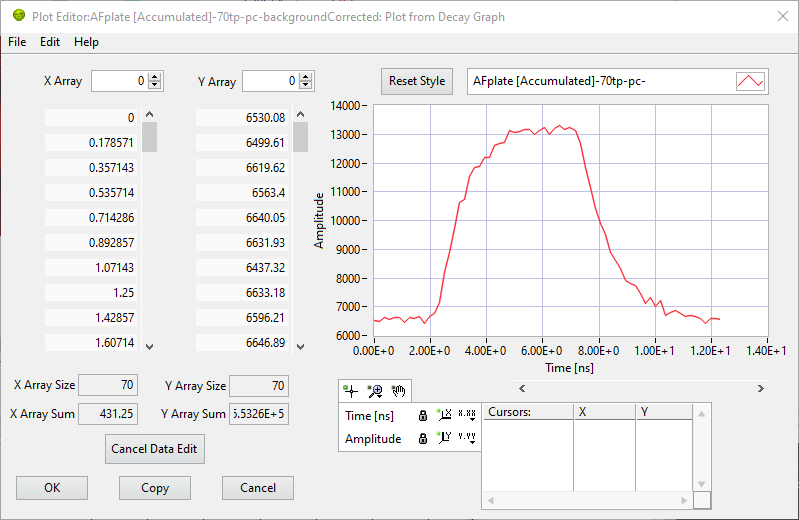
The graph on the right shows the plot as it appears in the original graph. Its style can be changed using the plot legend functions. Any such changes can be reverted while in the editor by pressing the Reset Style button.
The two arrays on the left (X Array and Y Array) display the plot data (X and Y coordinates of each points). Both arrays are linked, therefore moving the scrollbar on one array also moves the scrollbar on the other, guaranteeing that each X value is matched by the correct Y value and reciprocally. However, this is only true if both arrays have the same size. This can be checked by looking at the X Array Size and Y Array Size indicators below each array.
The arrays can be modified in different ways (each array is modified independently).
Array modification
Right-clicking any of the array shows the following menu:
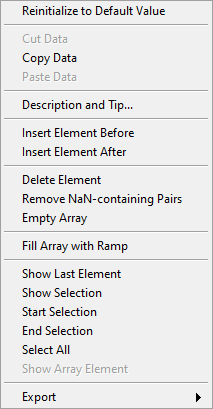
which allows performing different array manipulations. Note that if one array size is modified, the other is automatically resized to match the new size.
Plot modification
Right-clicking the graph shows the following menu:
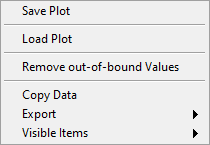
which allows loading a plot (datac column ASCII file with or without header
lines) or saving the current plot, but also enables data cropping (Remove
out-of-bound Values) by eliminating any point not within the visible range of
the graph.
Once modifications to the plot have been completed, 3 different actions can be performed:
OK: accepts all changes and returns to AlliGator. The original plot will be replaced by the modified one.
Cancel (Esc keyboard shortcut or window close box): returns to AlliGator without applying any of the changes.
Copy: accepts all changes and returns to AlliGator. The original plot will not be modified, and the modified one will be added to the graph, with
(dup., edit.)added to the plot name.
Warning
While the Plot Editor window is opened, most of the calling application’s GUI elements are unresponsive. It is possible to open another window or switch to a different panel, but selecting any action in these or the main menu will not be followed by any actual action until after the Plot Editor window is closed.